News

What's new in SANDYNE

Release notes, announcements, and what we're working on. Newest first.

SANDYNE 2.5#

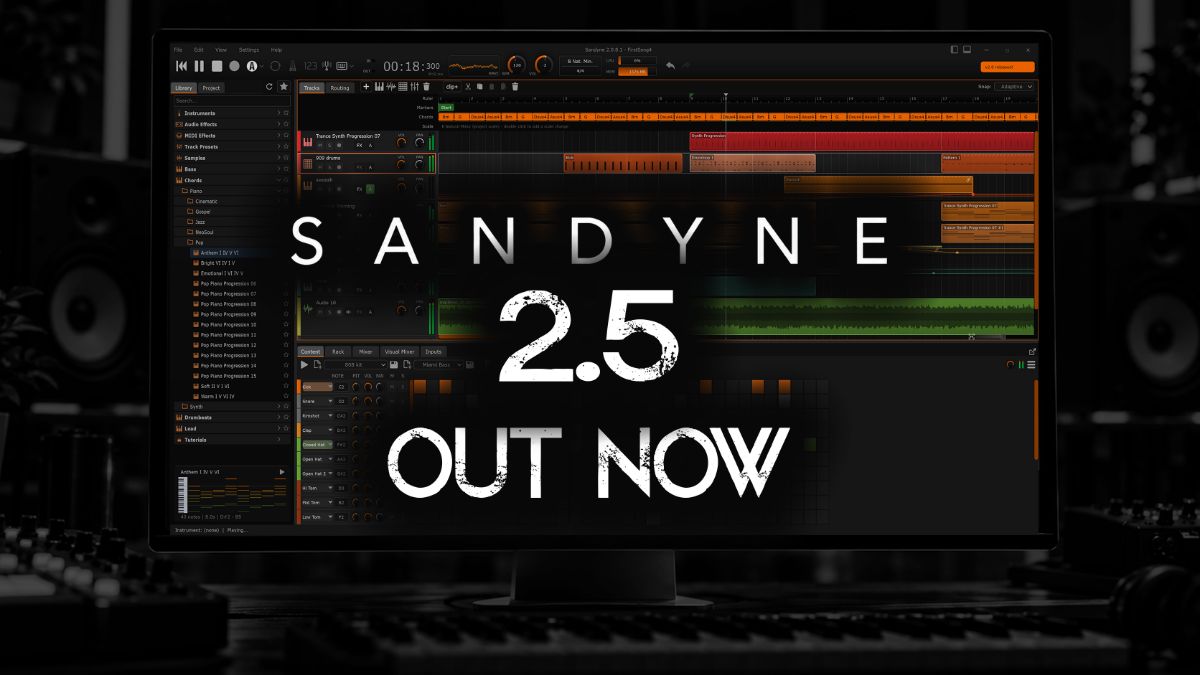
SANDYNE 2.5 out now — the app shown on a studio monitor.

2.5 is here. It adds a Recorder and a MIDI Recorder that catch what you play, multitrack recording, a Routing tab you patch by hand, clips you can loop and stretch, a Harmony view in the piano roll, ten new Syna oscillators and Audio Unit support on the Mac.

Watch the highlights at https://youtu.be/rf4sWoGv4AI

New: Recorder and MIDI Recorder

  • Recorder — put it in any effect slot to capture what passes through, then edit the take in a built-in sample editor.
  • Record manually, on play or on signal, with a recording length from 1 minute to unlimited.
  • Play the take back through the slot, drag it onto the timeline, or turn a selection into a new clip.
  • Takes are written to disk while they record, and silent takes are thrown away.
  • MIDI Recorder — captures the notes you play, even with the transport stopped.
  • Play it back, loop it, open a MIDI file into it, save it as MIDI, or turn it into a new piano roll track.
  • A recording in progress is backed up to the project folder every 15 seconds.

Recording

  • Multitrack recording: arm several audio tracks and record each from its own input at the same time.
  • Up to 128 tracks (was 64)
  • Keyboard shortcuts for Record and the Metronome.
  • Per-track MIDI playback offset moves a track’s MIDI up to 500 ms earlier or later.

Syna

  • Ten new oscillators: AM Sync, Feedback Saw, Vowel, Harmonic Scan, Pulsar, Drawbar, LFSR Noise, Undertone, Mallet and Chord Stack.
  • New waveform browser with families and search; hover over a waveform to see its shape animate.
  • The PW knob now does something on every oscillator, with its own role for each waveform.
  • Filter Mode knob: low-pass, band-pass, high-pass and notch.
  • Click a section title (FILTER, FILTER ENV, AMP ENV) to switch that section on or off.

Other instruments

  • Analog Drums: more algorithms, per-voice mute, solo and choke, a mod matrix and expression controls.
  • Analog Drums: Volume now goes up to +6 dB.
  • Terrain: five new landscapes.
  • Terrain, Sub, Water and Sampler: new pitch envelope.
  • Drums: send a pattern to another track’s instrument or to a MIDI output.
  • New drum fills for every style.

Effects

  • New Multiband compressor — up to six freely placed bands, each with its own compression and optional sidechain.
  • New Echo — a feedback delay with 18 factory presets.
  • New Gain utility for trim and channel work.
  • New Noise Gate replaces Gate, with a level history graph.
  • Limiter and Compressor: a new Opto engine; projects saved earlier keep their original sound.
  • Limiter and Compressor: switching modes keeps the level matched.
  • Compressor: VCA Color, plus an EXT button that shows its sidechain source.
  • Maximizer: a second, more authentic mode.
  • Exciter: richer harmonics.
  • New visualizers in Exciter, Maximizer, J-Chorus and MicroShift; MicroShift also gets presets.
  • Visualizer: redesigned Scope view; Visualizer and EQ panels resize by dragging their right edge.
  • MIDI Router: note range filter.

Sound quality

  • Sample clips, drum hits, Sampler and Slicer use a high-quality resampler, so highs are cleaner when a sample’s rate differs from the project’s or it is pitched up.
  • Overdrive and Tape are oversampled, with much less harsh aliasing at high drive.

Timeline & clips

  • Clip looping: drag a clip’s right edge past its end to repeat it (can be turned off in Preferences)
  • Time-stretch audio clips with Alt + drag on a clip edge.
  • Overlapping audio clips crossfade.
  • Adaptive grid snap follows your zoom level, and clip edges snap magnetically.
  • Follow playhead: the arrangement scrolls with playback.
  • Choose what Stop does: by default it returns to where playback started, and a second Stop goes back to the beginning.
  • Add a clip at the playhead, or one that fills the loop range.
  • A splitter between a track’s clips and its automation lanes, saved with the project; a collapsed track folds its lanes away.

Piano roll & harmony

  • New Harmony dropdown shows chords and scales; every scale tone is tinted, and notes are coloured by key.
  • Mini chord lane, Detect chords to Harmony lane from a clip’s right-click menu, and Clear all chords.
  • New Erase and Mute tools.
  • Quantize is now a split button with options.
  • Pinch a trackpad to zoom where you’re pointing.
  • Copy and paste clip automation between lanes (e.g. CC 1 to CC 11)

MIDI import & export

  • A multi-track MIDI file becomes one track per part.
  • Dropping MIDI below the tracks creates a Syna track; dropping it on a track adds a clip and keeps the track’s name.
  • Export selected clips as MIDI; the export matches what the clips play.

Automation & modulation

  • New step sequencer modulator, locked to the transport when synced.
  • Automation curves bend more visibly and can go fully abrupt.
  • Automation lanes: a size setting, multi-point selection, and lanes in the track’s own colour.
  • Plugin parameters in the modulation and automation pickers are grouped, filtered and searchable.

Routing & mixing

  • The Routing tab is now a patch bay: drag between ports to connect, then select a route and press Delete to remove it.
  • It also shows the routes that bypass a track’s main output, such as drum rows and multi-output instruments.
  • Buses can feed other buses, laid out in columns.
  • Double-click empty space in the Routing tab to add a track.
  • Mixer: faders stay visible on collapsed strips, and inserts and sends grow with the panel.
  • Visual Mixer: a track filter, plus a pan curve showing where the mix’s energy sits, with the selected track drawn on it.
  • Metering: every level meter in the app shares one scale, fall speed and colour scheme.

Plugins

  • Audio Unit (AU) support on macOS. (AUv3 not yet)
  • Plugin pickers: type filter, a resizable grid and A-Z sorting.
  • A more robust plugin scanner: a stuck plugin is timed out and named, with no error pop-ups.
  • Export can render at real-time speed (1x) for plugins that can’t run faster.

Controls & workflow

  • New track preset picker: a quick list or a three-pane browser showing description, tags and signal chain.
  • Preset manager: search and clickable stars.
  • Knob values: an optional value bubble, and every change shown in the status bar.
  • Tooltips show each control’s current keyboard shortcut.
  • Zoom to Fit button in every editor.
  • Open any bottom tab in a window of its own, with the layout restored next time; hide Mixer, Visual Mixer or Inputs from View > Context Tabs.
  • The DAW you pick on the welcome screen also sets Stop behaviour, auto-scroll, clip looping and transport shortcuts.
  • Sample editor: Snap dropdown, a hover line showing the time under the pointer, an Audio file info section, and Playtime and Pitch slider popups.
  • Remote control can be limited to this computer; controller scripts go in Documents/Sandyne/Controllers.

Tutorials

  • New hands-on lessons played with real mouse gestures: audio clips, the piano roll, drum beats, lanes, and routing through a bus.
  • Tutorials are translated.
  • Playback speed control, one-click start, and lessons ordered basics first.

Translations

  • Added German and Simplified Chinese.

Performance & polish

  • More responsive under heavy load: the OpenGL renderer lowers its frame rate instead of switching off.
  • Audio files import in the background.
  • A plugin that outputs broken audio is silenced at its slot, and SANDYNE tells you which plugin it was.
  • Crash reports can include an optional contact email to help you troubleshoot it.
  • Refreshed visuals: a new playhead with a triangle head, flag-style loop markers, redesigned piano keys, a switchable logo in the arrangement, a playhead colour setting and a Halloween colour theme.

All platforms — Windows, Mac and Linux — are now on 2.5. Grab it on the download page.

SANDYNE 2.5 is on the way#

SANDYNE 2.5 is coming soon. Update, 2 October: it's out — see SANDYNE 2.5. It follows 2.0, and the highlights video shows what's new.

Watch the highlights: https://youtu.be/rf4sWoGv4AI

SANDYNE 2.0#

2.0 is here. It opens SANDYNE up to more of your plugin collection with CLAP and LV2, brings a new analog techno synth, a much deeper Syna, automation curves, a command palette, and translations that now cover most of the interface.

See a demo at https://youtu.be/N9cU2bS-c3g

Plugins & audio engine

  • Added CLAP plugin support.
  • Added LV2 plugin support (Linux).
  • JACK is now enabled on Linux.
  • Added support for plugins with multiple audio outputs.
  • Lame 4 support for better MP3 quality.
  • More optimised plugin scanner.
  • Mac / Linux: plugin windows are kept inside the app.

New instrument: Hooverdrive

  • Hooverdrive — a six-voice recreation of a classic mid-'80s Japanese analog polysynth, measured from the hardware.
  • DCO with saw, pulse, sub and noise, plus PWM.
  • Resonant filter with a seven-stage envelope, and chorus.
  • SysEx bank import for loading hardware patches.

Syna

  • Added a mod matrix.
  • Added vintage, stereo width and filter drive controls.
  • Added oscillator morphing.
  • New Bell FM oscillator (the Juno oscillator is retired).
  • SAW PWM is now integrated into the SAW oscillator.
  • The Pluck oscillator has been revoiced.
  • Oscillator range extended from −2…+2 to −3…+3.
  • Robot redesigned, with a "play whole sentence" mode and new controls.
  • Key track now only opens the filter, plus zipper-noise fixes.
  • Presets updated throughout.

Other instruments

  • Synth, Terrain, Sub and Water now support a filter env amount range of −100%…100%.
  • Ambient: added an "always play" option.

Effects

  • New Vinyl effect — rotation-locked scratch pops, dust crackle, surface noise, wow and record ageing.
  • New Velocity MIDI effect — reshape note velocity through a curve you draw.
  • EQ: dynamic EQ, mid/side and left/right processing, and a Window mode.
  • Tape: improved emulation, with preset support.
  • Arpeggiator MIDI effect now supports patterns.
  • Effects default to sync modes.

Automation & modulation

  • Automation now supports curves, in a range of curve types.
  • New MIDI controller modulator — mod wheel, pitch wheel, aftertouch and more.

Timeline & MIDI

  • Added Chords and Time Signatures lanes.
  • Improved MIDI import.
  • SysEx sending.

Piano roll

  • Added the Knife tool.
  • New visualisation options.
  • More arpeggio patterns.

Audio conversion & editing

  • Stem separation: added quality modes.
  • Audio to MIDI: drum audio conversion, plus additional settings.
  • Sample editor: waveforms now also show RMS, with new menus.
  • Beats editor renamed to Drums, with improved controls.

Routing & inputs

  • The Inputs tab has been rewritten, with gain and monitoring.
  • Sidechain-only tracks, via a "None" output.
  • The record audio input menu now shows Has signal when an input is live.
  • The master bus is shown by default.
  • "Sample track" is now called Audio track.

Controls & workflow

  • New command palette.
  • Ctrl + Shift + drag a clip to create an alias clip.
  • View menu: zoom options, and "set all tracks to use theme".
  • Improved controls when saving presets.
  • Double-click to open .sand project files.
  • Mac: undo / redo buttons are now shown.
  • More tooltips throughout, and updated tutorials.

Translations

  • Translations now cover most of the interface.
  • Added Korean and Portuguese.

Performance & polish

  • Compile-time and memory optimisations.
  • fl_compat improvements.
  • Linux: added a crash dialog.
  • Improved visuals across the app.

All platforms — Windows, Mac and Linux — are now on 2.0.0. Grab it on the download page.

Linux is out of early access#

The Linux build is no longer a private preview — it's a normal, public download alongside Windows and Mac. No request form, no waiting list: grab it straight from the download page.

The current Linux release is 1.5.0.3, shipped as a .tar.gz installation package.

Download for Linux

SANDYNE 1.5.0#

The biggest release yet. 1.5.0 brings deep audio-editing tools, full automation recording, tempo/time-signature/marker lanes, broad project interoperability, and a long list of piano-roll and workflow refinements.

See a demo at https://www.youtube.com/watch?v=mjY0x5xZfG8

Audio editing & conversion

  • Added a Pitch Editor to the Sample Editor.
  • Added polyphonic audio-to-MIDI conversion.
  • Added audio export dithering.
  • Added plugin delay compensation.
  • Added VST sidechain audio support.
  • Added a Brickwall mode to the limiter.

Recording & automation

  • Added an Inputs tab for input monitoring.
  • Added Touch, Latch, and Write automation recording modes.
  • Added support for note-based automation curves.

Timeline & arrangement

  • Added tempo lanes.
  • Added time signature lanes.
  • Added marker lanes.
  • Improved Freeze, Refreeze, and Unfreeze performance.

Plugin & MIDI support

  • Added support for VST MIDI effects.
  • Added a keyboard shortcut editor.

Project & file compatibility

  • Added import support for Reaper .rpp projects.
  • Added DAWproject export support.
  • Added stem WAV import and export.

Piano roll

  • Added multi-note stretching.
  • Improved the velocity editor grid.
  • Improved the default multi-tool cursor.
  • Added zooming with the mouse wheel over the virtual piano.

Visual & workflow improvements

  • Added an optional track lane tint theme setting.
  • Improved the appearance of the web version.
  • Added visual key, scale, and rhythm information to the musical settings window.
  • Improved monitoring graphs in the EQ, EQ3, and Audio Visualizer.
  • Added marquee selection to the Visual Mixer.
  • The Sample Editor sidebar is now shown by default.

Audio & interface improvements

  • Reduced clicks when playback is stopped.
  • Improved playback of very short looped sample previews.
  • The bottom panel now retains its size when the window is resized.
  • Improved handling of VST plugins that do not support window resizing.

Grab the latest build on the download page.

SANDYNE 0.9.9.8#

A big all-round update: a friendlier startup, smarter editing in the piano roll, real metering and automation recording in the mixer, better-sounding effects, and a wide sweep of performance and stability fixes.

General

  • Quick setup on startup surfaces the main configuration options the first time you launch.
  • GPU acceleration is now available — off by default for the most stable out-of-the-box experience. Turn it on any time in Settings (or with --gpu) if your machine benefits from it.
  • Metronome options panel added.

Piano Roll & editing

  • Smarter multitool is now the default, with more reliable modifier-key behaviour and a handy hold-B shortcut.
  • Copy clips with Ctrl/Cmd + drag.
  • Redesigned Quantise button and cleaner clip-resize behaviour.
  • Ghost note view and a Middle C naming option.
  • Musician-standard snap values (1/4, 1/2, 1/1…) in the tracks panel and snap menu.

Mixer & automation

  • Record automation for track Volume/Pan knobs and effects.
  • VU / LUFS / RMS metering in the mixer.
  • Collapse-all support and refined fader / volume-slider mapping.

Instruments & effects

  • Better-sounding effects across the board: improved Bitcrusher low-bit modes, retuned Overdrive and Tube modes, and a more reliable reverb Freeze.
  • Optimised default settings and knob ranges so effects sound good immediately.
  • The Ambient instrument now responds to notes, and the Synth layout was tidied up.

Export

  • Choose exactly which tracks to export in the audio export dialog.
  • Export a single track directly from its right-click menu.

Themes & visuals

  • New "Dark" clip colour default with improved light/dark clip theming.
  • Numerous visual-polish improvements throughout the app.

Performance & platform

  • Smoother playback and editing with fewer CPU spikes and audio glitches, and lighter overall CPU use.
  • Command-line GPU controls (--gpu / --no-gpu).

Stability

  • A wide range of reliability fixes — smoother undo/redo, more dependable playback and export, safer project loading, and steadier text-field editing.

Grab the latest build on the download page.

Introducing Learn — making music, explained#

The site now has a Learn section: tutorials for SANDYNE, and the ideas behind every DAW — music theory, synthesis, mixing, and the concepts you'll meet in any studio.

Lessons are interactive, so you can hear and tweak what you're reading about instead of just taking our word for it. More topics are on the way.

Preview build now public for Windows & Mac#

The SANDYNE preview is now open to everyone on Windows and Mac — no early-access request needed. Head to the download page and grab the installer for your platform.

It's still a preview while we polish the last rough edges, so expect the occasional sharp corner. Bug reports and feedback are very welcome and genuinely shape what we fix next.

Update, 25 July: the Linux build is now a public download too — see Linux is out of early access.

← Back to SANDYNE